Equipment supplied
A POS station suited to the way your business operates.

We provide the POS equipment and install the Bellezza system on it. Your team checks clients out from a station connected to appointments, client records, sales, inventory and business oversight.
Equipment prepared with Bellezza and a guided setup for your team.
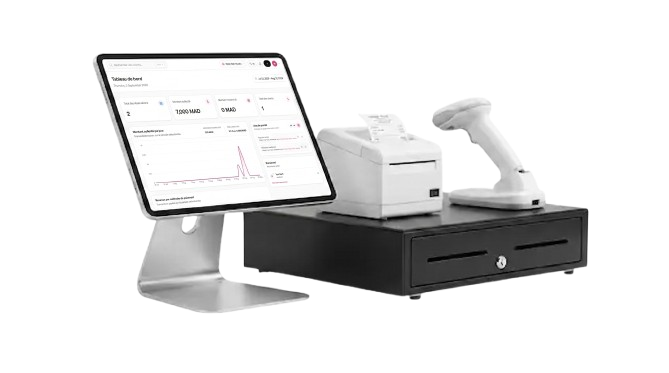
A POS station suited to the way your business operates.
The system is prepared directly on your equipment.
Appointments, sales, inventory and oversight stay linked.
Your team is supported through the initial handover.
Setup process
We discuss your space, front-desk operations and the peripherals that are useful to your business.
The POS hardware is prepared with Bellezza installed and the access required for your location.
Services, team members, payment methods and products are organised with you so checkout connects to the rest of the business.
Your team learns the checkout journey and receives a station ready for everyday operations.
Inside Bellezza POS+
Retrieve the client, services and associated products before recording the payment.
Record cash, card, bank transfer, wallet, gift card or online payment according to your configuration.
Keep a clear view of what has been received and what remains outstanding.
Add products sold at the front desk and keep each stock exit connected to inventory tracking.
Each person accesses the actions allowed by their role and assigned location.
Find payments by period, status, payment method, client or location.
Apply coupons, gift cards and benefits configured in Bellezza when the client checks out.
Review sales, payments, balances and the indicators needed for daily management.
The POS+ station
The POS station is supplied with Bellezza installed. Its composition is agreed with you so the equipment suits the available space and the operations completed at the front desk.
Your business receives a dedicated station for accessing Bellezza and managing checkout operations.
The system is prepared on the terminal to connect the front desk with your business data.
A cash drawer, receipt printer or scanner can complete the station according to your needs and confirmed compatibility.
The exact station and peripheral configuration is confirmed with your business before the equipment is prepared. The hardware shown is an example installation.
FAQ
Yes. Bellezza POS+ combines POS equipment supplied by Bellezza with the management system installed on that station.
Yes. The terminal is prepared with Bellezza so the business has a coherent environment from the moment it is put into service.
The station includes a POS terminal and can be completed with suitable peripherals such as a cash drawer, receipt printer or scanner. The configuration is confirmed according to the needs of the business.
Yes. Checkout can start from the appointment and retain the connection to the client, services, products and outstanding balance.
Yes. Front-desk sales and inventory movements remain managed in the same operating environment.
Yes. Authorised roles can access Bellezza on the web and view the information allowed by their role and location.
Bellezza POS+